Improved
Account Menu Moves to the Side Navigation
October 5th, 2026
What's New
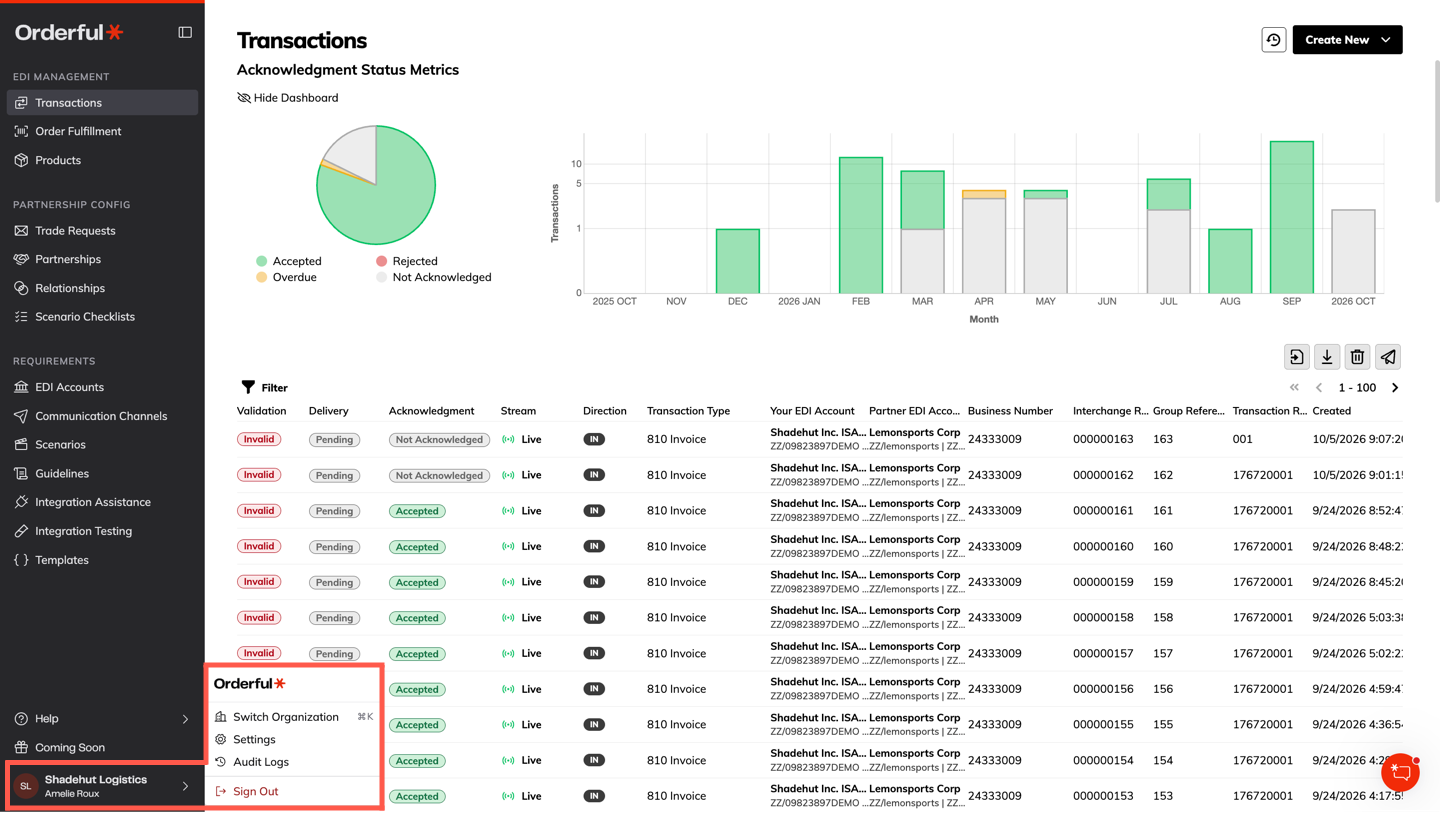
Your account controls now live in one place. The organization switcher, Settings, Audit Logs, and Sign Out have moved from the top bar into a new user menu at the bottom of the side navigation. Click your name to open it.
The side navigation is also faster. Expanding and collapsing it is more responsive, especially on busy pages like Transactions, and returning to an Orderful tab no longer causes the page to pause.
What's Changing
| Settings | Before | After |
|---|---|---|
| Organization switcher | Top bar | User menu, bottom of the side navigation |
| Settings, Audit Logs, Sign Out | Top bar account dropdown | User menu, bottom of the side navigation |
| Page header actions | Various placement | Aligned to the right edge of the page header |
- Keyboard shortcut unchanged: press ⌘K (Mac) or Ctrl+K (Windows) to switch organizations from anywhere.
- Header dropdowns now open toward the left so they stay fully on screen.
How to Access
No action is needed. The new user menu is available to all users at the bottom of the side navigation.