
Trade Request statuses
When a new Trade Request has been submitted, it will move through a series of statuses.
You can see the status of a Trade Request go to your Trade Request settings page. To see Trade Requests that have been Accepted, Rejected, or Cancelled select Show Hidden in the upper right of the page.
| Trade Request status | Definition |
|---|---|
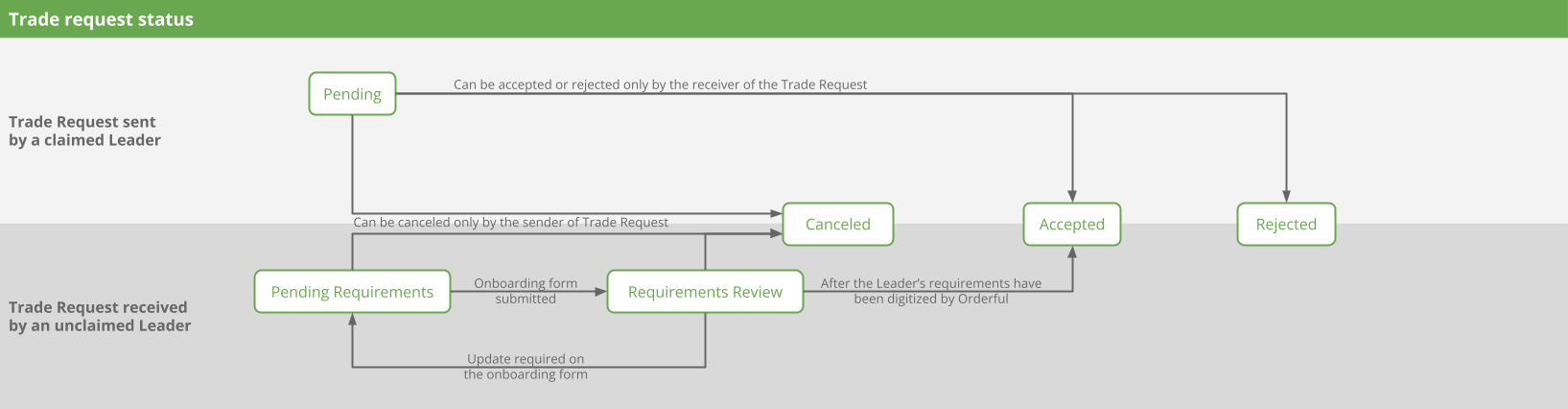
| Pending | The Trade Request has been submitted by the sender and is targeting a claimed Leader or Follower. AND The recipient hasn't accepted or rejected it. The Leader of the Trade Request can add or remove Scenarios. |
| Pending requirements | The Trade Request has been submitted by the sender who is a claimed Follower and is targeting an unclaimed Leader. AND The onboarding form with the unclaimed Leader's requirements hasn't been submitted yet. |
| Requirements review | The Trade Request has been submitted by the sender who is a claimed Follower and is targeting an unclaimed Leader. AND The onboarding form with the unclaimed Leader's requirements has been submitted and is under review by the Orderful team. |
| Accepted | The recipient has accepted the Trade Request. The Trade Partnership and Relationship(s) will be created based on the Scenarios included in the Trade Request. |
| Rejected | The recipient has rejected the Trade Request. No Trade Partnership has been created. |
| Cancelled | The sender has cancelled the Trade Request. No Trade Partnership has been created. |
The transitions between the different statuses are illustrated below:
Updated about 1 month ago