

Partnership Page
Overview
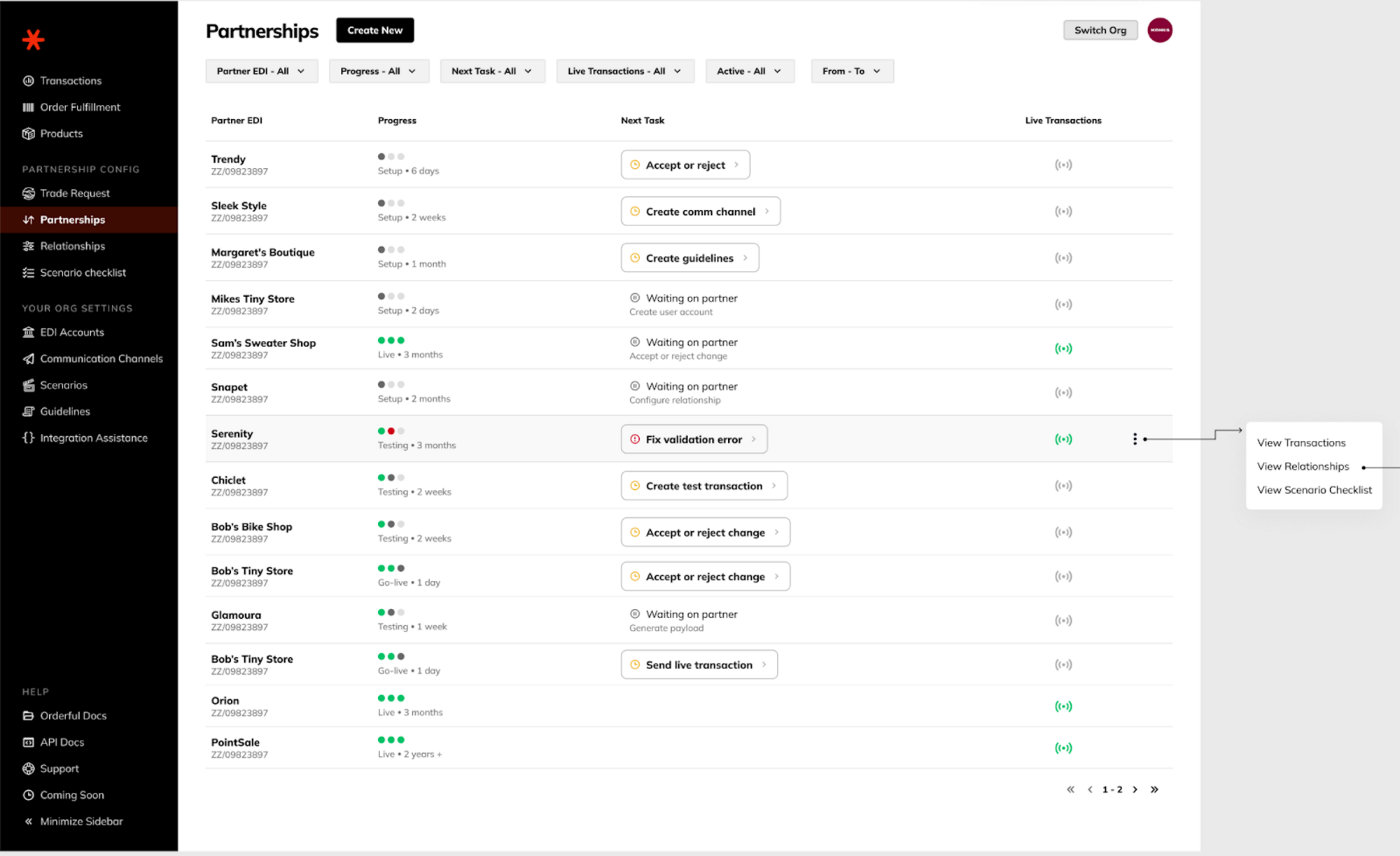
The page shows each partnership's current progress and next task. The most relevant next task is chosen to show to keep focus. From each row you can:
- Drill-down into transaction, relationships, or scenario checklist by clicking on the (⋮) at the end of the Partnership row
- Progress column now shows the a reduced set of progress steps
- Setup, testing, go-live / live
- Progress column shows age of the current task
- Hover state in Live for the 'Live Transactions' beacon to see a quick view of which transactions are live vs still pending.
Go Live Target Date
The Go Live Target column shows the planned go-live date for each partnership. When a target date has been set, the column displays:
- The formatted date (e.g., Jun 16, 2026)
- A relative label below it — Today, N days (counting down to the target), or N days ago (past the target) — so you can gauge urgency at a glance without doing mental math.
If no target date has been set, the column shows a dash (—).
Updated 4 months ago
What’s Next
Did this page help you?